Airbnb AI Is Changing Your Cover Photo: Why It Costs You

Airbnb's AI is now changing your cover photo for you — and of everything that shipped in the 2026 Summer Release, this is the one change that actually costs hosts money. An algorithm now picks which of your first five images guests see on the search page, swapping in whatever it predicts will convert, often without the host noticing. That sounds cosmetic. It isn't. AirROI market data shows top-quartile listings earn 59-84% more RevPAR than the median, and the lever behind most of that gap is presentation — the exact surface this airbnb AI changing cover photo behavior now controls. This piece breaks down what the 2026 release does to your listing, why the cover-photo swap is the expensive one, and how to respond without fighting the platform on every front.
From AI assistant to AI editor: what the 2026 Summer Release actually does
The 2026 Summer Release — more than 220 updates announced on May 20 — moved Airbnb's AI from assisting hosts to acting on their listings. Previous releases gave hosts AI suggestions to accept or reject. This one ships features that change the listing and speak to the guest directly, with the host one step removed.
Four shifts matter most. Smart Setup builds a listing from an address and uploaded photos: computer vision parses the rooms while a language model writes the description, structures the amenities, and pulls in neighborhood context, collapsing listing creation from nine steps to one. An AI cover-photo selector now chooses which of your first five photos becomes the cover each guest sees, personalizing it to their search intent. Personalized highlights mean the same listing surfaces different lead photos and amenity callouts depending on who is searching. And "Ask About This Home" answers a guest's pre-booking questions from your listing data, photos, and reviews — without the host in the loop. Airbnb also restricted custom house rules to a standard menu of quiet hours, smoking, and pets, with anything custom requiring Airbnb's approval.
| What the host controlled | Before the release | After the 2026 Summer Release |
|---|---|---|
| Cover photo | Host picks; optional shuffle toggle | AI picks per guest from the first 5 photos; explicit toggle removed for many accounts |
| Listing creation | Host writes a 9-step listing | Smart Setup AI generates it from an address and photos |
| Pre-booking guest questions | Host answers in messages | "Ask About This Home" AI answers from listing data; host unseen |
| Highlights and amenities shown | Same for everyone | Personalized per searcher by AI |
| Custom house rules | Host free-texts any rule | Standard menu only; custom needs Airbnb approval |
The mechanism behind the cover swap is not a rumor — it comes straight from Airbnb's own support team. As one host relayed after contacting support, the platform is "now using an AI algorithm to choose the cover photo for guests based on what the algorithm thinks guests want to see the most… it will only be shuffling between the first 5 images." Dom Trovato of The Host Report put the consequence plainly: "For hosts, this means you no longer control what your listing surfaces."
The cover photo hosts didn't choose
Within days of the release, hosts on r/airbnb_hosts and the Airbnb Community forum reported the same thing: the AI silently swapped their cover photo to a weaker image, and edits would not make the original stick. This is the most visible loss-of-control complaint of the entire 2026 rollout.
The frustration is specific and operational. "I absolutely hate this stupid AI that Airbnb has forced on us," one host wrote in a thread titled "Airbnb Summer AI release: Cancelling bookings, changing photos." "It keeps changing my cover photo to other pictures that won't attract guests the way my original photo did." Another host in the same thread noted the AI promoted their worst asset — "our hot tub photo is our worst photo, so now we have to redo that one" — and described checking the listing from a second browser only to find the cover already changed.
"Airbnb's AI should not be overriding our featured photos without our consent." — Superhost, Airbnb Community forum, "Airbnb Is Forcing Cover Photos – Why Can't Hosts Choose Their Own?"
The thread where a host first documented the support explanation — "Hosts no longer have control over cover photo" — drew 38 upvotes and 66 comments, a strong signal for the subreddit. This is not a fringe complaint. Airbnb counts 5.5 million hosts, 87% of whom operate just one or two listings, and roughly half rely on that income to get by, per data cited by The Host Report. When the platform overrides the first impression on a single-property host's only listing, it is reaching into the conversion surface that household depends on.
Why the cover photo is the change that costs money
The cover photo is the single biggest click-through lever a host controls, which is precisely why an AI override is a revenue-control problem rather than a styling preference. A guest spends roughly two to three seconds on a cover image before scrolling to the next listing, so the photo that wins or loses that glance sets the click-through rate (CTR) that feeds everything downstream — search ranking, views, and bookings.
The economics are well documented. Listings with professional photos earn about 28% more bookings, command 26% higher nightly rates, and lift overall earnings by roughly 40%. An academic study of 13,000 listings and 510,000 photos across seven US cities found that high-quality verified photos generated $2,521 more per year and a 17.51% booking increase, with color and clarity attributes alone worth thousands in annual revenue. When an algorithm promotes a duller image, it is not changing decor — it is moving the number that determines how many guests ever click.
AirROI's own market data shows where that money actually lives. Across three very different markets — a desert resort city, a historic-charm Southern city, and a European capital — the spread between a median listing and a top-quartile listing is driven by presentation and quality, not by pricing alone.
| Market (active listings) | Median RevPAR (p50) | Top quartile (p75) | Top decile (p90) | p75 vs. median |
|---|---|---|---|---|
| Scottsdale, AZ (5,395) | $153 | $281 | $469 | +84% |
| Savannah, GA (2,933) | $124 | $196 | $308 | +59% |
| Lisbon, Portugal (15,737) | $79 | $127 | $197 | +61% |
Source: AirROI market data, trailing-12-month average monthly RevPAR, accessed June 2026.
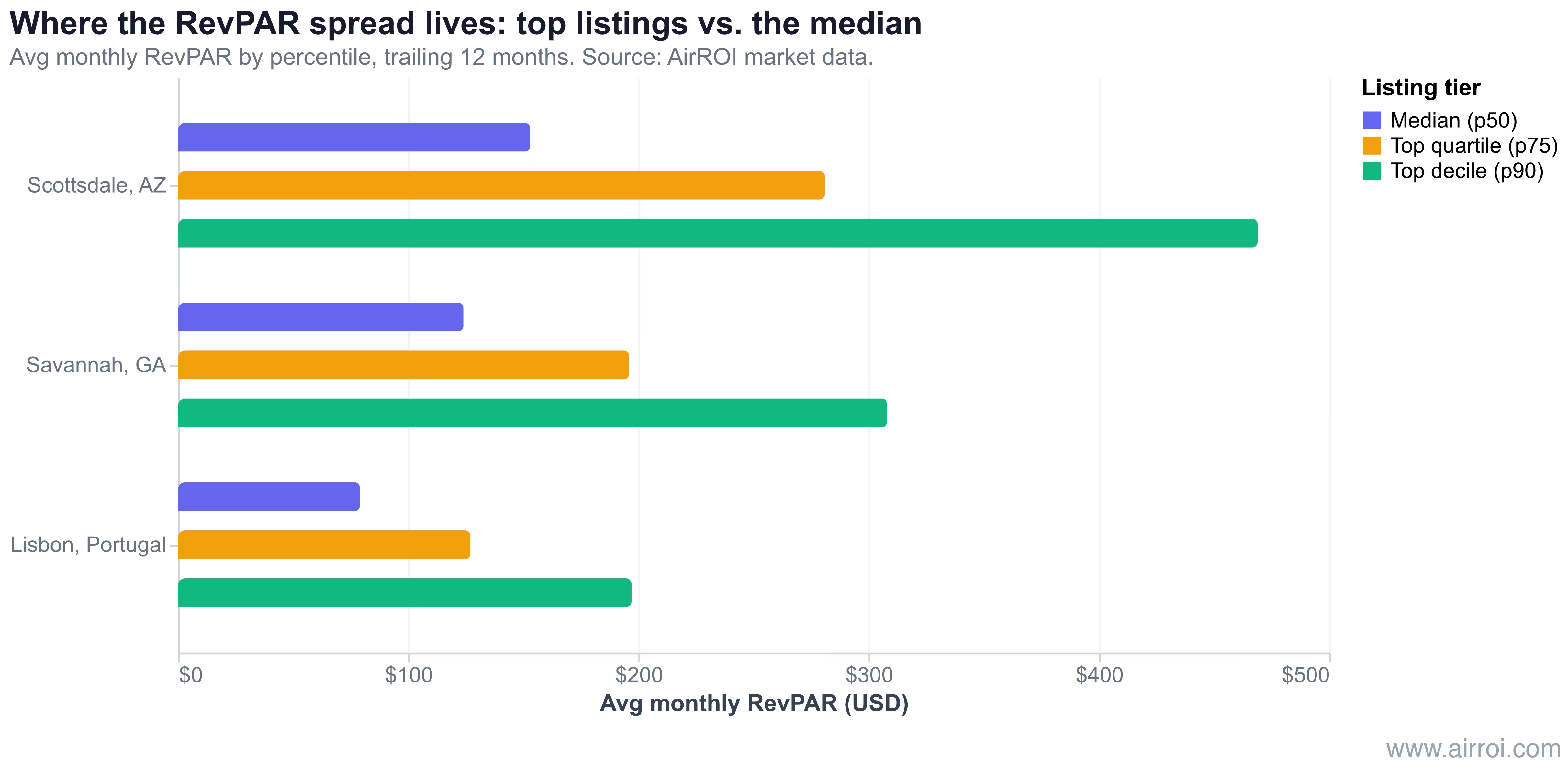
Read the numbers carefully. The top-quartile listing out-earns the median by 59-84% on RevPAR (revenue per available rental-night), and the top decile out-earns the median by 149-207%. That spread is the listing-quality premium, and presentation is its leading edge. This is the same pattern documented in our analysis of why top-quartile listings earn 62-82% more RevPAR even where most operators already run dynamic pricing — the frontier has moved from pricing algorithms to listing quality. An AI that downgrades your cover image is reaching straight into that frontier.
The cover-photo swap is not a cosmetic tweak. It is the platform editing the highest-leverage conversion asset on a listing, in markets where presentation separates a $153 RevPAR from a $281 one.
Hosts, one layer back: the AI is now your listing's narrator
The deeper shift behind the cover swap is that an AI now interprets your listing to the guest — choosing what to highlight, answering questions in your place, and ranking your home against the one next door. The cover photo is just the most visible instance of a broader move that puts every host one layer behind an algorithm.
RentalScaleUp's Uvika Wahi describes the new reality precisely: a guest's interaction with a listing "is increasingly mediated by an Airbnb AI sitting between your listing and the guest," deciding "what to highlight, answering questions in your stead, and comparing your home against the one next door on criteria the algorithm picked." "Ask About This Home" is the clearest example. When a guest asks "Is this good for a family with a toddler?", the host never sees the question; the AI answers from tagged amenities, structured house rules, photos, and reviews. If the crib, the stair gate, and the quiet-street context are not filed as structured fields, the AI either says it doesn't know — killing the inquiry — or answers generically and fails to close.
This matters more every quarter because of where booking now happens. App bookings reached 63% of nights booked in Q1 2026, up from 58% a year earlier, according to Airbnb's Q1 2026 results, with app nights growing 22% year over year. The AI-personalized surfaces and conversational answers live in the app, so the AI interpreter now sits in front of a growing majority of demand. Airbnb's ranking reportedly weighs more than 800 signals and increasingly matches natural-language queries — "quiet condo near downtown with parking" — against your listing's actual content rather than just filter tags. The same 2026 Summer Release also reshaped where host revenue comes from across new service categories, but for the listing itself, the headline is simpler: structured data is now the script the AI reads on your behalf.
How to reclaim control — and structure for the AI
The durable response is two-part: reclaim the settings you still own, then make your listing data machine-legible so the AI's defaults represent you accurately. Fighting every individual auto-change is a losing game; controlling the inputs the AI draws from is not.
Reclaim the cover photo
Start with the toggle. Hosts who have stopped the AI cover shuffle did it by finding the "best image" or "Allow Airbnb to optimize my photos" control in the listing's Photos section and switching it off. Where that toggle isn't visible — some hosts report it missing on app and desktop — the community workaround is to delete the photo the AI is using as the cover, set your preferred image as cover, then re-add the deleted photo, and re-check periodically because the AI tends to revert. Because the algorithm chooses within your first five images, the more important move is to make every one of those five lead photos strong enough that any AI selection still converts. You no longer pick a single cover; you control the pool the AI picks from.
Make the listing machine-legible
Structure beats prose in the AI-discovery layer. Tag every amenity precisely rather than burying it in a description paragraph, complete your house rules within Airbnb's standard menu, and fill in location and neighborhood context so "Ask About This Home" has accurate material to answer with. Our SEO checklist for listing descriptions that convert and the breakdown of which amenities actually boost revenue both apply directly: the same details that helped human scanners now feed the AI parser. Reviews matter too, because the AI synthesizes recurring themes from them — the more consistently your guests mention the things you want surfaced, the more accurately the interpreter represents you.
Verify against your market
Finally, benchmark. Pull your listing's RevPAR and compare it against the percentile bands for your market — if you sit at the median while top-quartile listings nearby earn 59-84% more, presentation and structured data are your fastest levers. You can compare RevPAR percentiles for any market in AirROI Atlas to see exactly where your listing falls and how much headroom the quality frontier holds.
The AI-discovery era arrives inside Airbnb
What is happening on the listing page is generative engine optimization (GEO) arriving inside Airbnb itself. The skill that defined the last decade of search — structuring content so an algorithm reads it correctly — has moved from Google's index into the booking funnel, where an AI now decides which photo, which highlight, and which answer each guest sees. The cover-photo swap that frustrated hosts this spring is the leading edge of that change, not an isolated bug.
The hosts who come out ahead won't be the ones who re-edit their cover photo every morning. They'll be the ones who keep their first five images uniformly strong, file precise structured data, and treat the AI as an interpreter that needs an accurate script rather than an adversary to be undone. In a release that moved Airbnb's AI from assistant to editor, the most valuable thing a host can do is make sure the editor has the right material to work with.
Frequently Asked Questions
Look for the "best image" or "optimize my photos" toggle in your listing's Photos section and switch it off — that stops the AI shuffle for many hosts. If the toggle is not visible, use the community workaround: delete the photo the AI is using as the cover, set your preferred photo as the cover, then re-add the deleted image, and re-check periodically because the AI tends to revert.
Yes. The cover image is the single biggest click-through lever, and listings with strong photos earn roughly 28% more bookings and 26% higher nightly rates. AirROI market data shows top-quartile listings earn 59-84% more RevPAR than the median across markets like Scottsdale, Savannah, and Lisbon, so an AI-downgraded first impression hits the most valuable conversion surface, not a cosmetic one.
Yes — "Ask About This Home" lets prospective guests ask questions directly on the listing page, and Airbnb's AI answers from your listing data, photos, reviews, and external context like maps, without involving you. The host never sees the question or writes the reply, which makes precise, structured listing data the script the AI reads on your behalf.
Make the listing machine-legible: tag every amenity precisely, complete house rules within Airbnb's standard menu, fill in location and neighborhood context, and put your strongest images in the first five slots. Airbnb's ranking now reads listing content against 800+ signals and conversational queries, so structured, accurate data is what lets the AI represent you correctly.